

Introduction
In today’s complex IT environments, managing passwords manually can be time-consuming, error-prone, and a significant security risk. This blog post will demonstrate how to automate VMware Cloud Foundation (aka VCF) password management using the VCF Terraform Provider and HashiCorp Vault.
By leveraging these powerful tools, you can significantly simplify your password management operations, especially in large enterprise environments.
Terraform Modules
Starting from scratch can be challenging and time-consuming, so we built two VCF modules to make your life easier.
Module 1: Passwordmanagement
The Passwordmanagement module leverages the VCF Terraform Provider to streamline VCF password management by automating password rotation. By setting up a cron job to apply the Terraform template, you can ensure that passwords are rotated only when they are nearing expiration.
Module 2: Vault
Whenever passwords are modified, this Vault module synchronizes the changes with your HashiCorp Vault system.
With these two Terraform modules, VCF customers can achieve end-to-end password management automation. The entire process operates without any human intervention, significantly minimizing the risk of password exposure or leaks. This ensures a secure and efficient approach to managing sensitive credentials within the VMware Cloud Foundation environment.
You can find these modules at: https://github.com/wukong919/terraform-vcf-passwordmanagement
How to Use the Modules
Below is an example of how to use the modules for your VCF password management.
main.tf
terraform {
  required_providers {
    vcf = {
      source  = "vmware/vcf"
      version = "~> 0.10.0"
    }
    vault = {
      source  = "hashicorp/vault"
      version = ">= 3.0"
    }
  }
}

provider "vcf" {
  sddc_manager_username = var.sddc_manager_username
  sddc_manager_password = var.sddc_manager_password
  sddc_manager_host     = var.sddc_manager_host
  allow_unverified_tls  = true
}

provider "vault" {
  address = var.vault_address
}
module "update-pwd" {
  for_each                   = var.system_secrets
  source                     = "wukong919/passwordmanagement/vcf"
  sddc_manager_host     = var.sddc_manager_host
  rotation_frequency_days = var.rotation_frequency_days
  resource_type              = each.value.resource_type
  account_type               = each.value.account_type
}
module "update-vault" {
  for_each      = var.system_secrets
  source        = "github.com/wukong919/terraform-vcf-passwordmanagement/helper/vault"
  vault_address = var.vault_address
  vault_vcf_passwords_mountpath = var.vault_vcf_passwords_mountpath
  secrets       = module.update-pwd[each.key].secrets
}

output "secrets_metadata" {
  value = {
    for key, i in module.update-vault : key => {
      vault_kv2_secrets = module.update-vault[key].secrets_metadata
    }
  }
}
variable.tf
variable "sddc_manager_username" {
  description = "Username used to authenticate against an SDDC Manager instance"
  default     = "administrator@vsphere.local"
  type        = string
}

variable "sddc_manager_password" {
  description = "Password used to authenticate against an SDDC Manager instance"
  default     = "VMware12345!"
  sensitive   = true
}

variable "sddc_manager_host" {
  description = "Fully qualified domain name of an SDDC Manager instance"
  default     = "sfo-vcf01.sfo.rainpole.io"
  type        = string
}

variable "vault_address" {
  description = "hashicorp vault"
  default     = "http://10.221.78.150:8200"
  type        = string
}

variable "vault_vcf_passwords_mountpath" {
  description = "hashicorp vault mounth path for VCF Passwords"
  default     = "vcf"
  type        = string
}

variable "rotation_frequency_day" {
  description = "secret rotation frequency"
  default     = 15
  type        = number
}

variable "system_secrets" {
  type = map(any)
  default = {
    "nsxm-system" = {
      "resource_type" = "NSXT_MANAGER",
      "account_type"  = "SYSTEM"
    },
    "esxi-user" = {
      "resource_type" = "ESXI",
      "account_type"  = "USER"
    },
    "nsxedge-system" = {
      "resource_type" = "NSXT_EDGE",
      "account_type"  = "SYSTEM"
    },
    "vcenter-system" = {
      "resource_type" = "VCENTER",
      "account_type"  = "SYSTEM"
    },
    "wsa-system" = {
      "resource_type" = "WSA",
      "account_type"  = "SYSTEM"
    },
   "vcf-backup" = {
      "resource_type" = "BACKUP",
      "account_type"  = "SYSTEM"
    }
  }
}
After you apply the Terraform template, your updated password will be stored in the Vault.
terraform apply -parallelism=1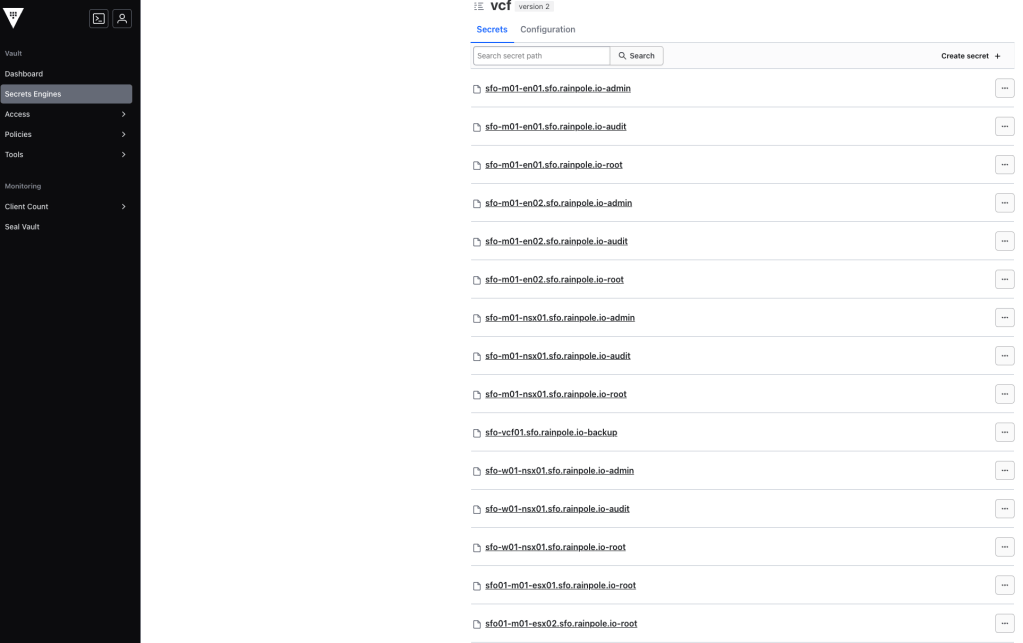
Beyond storing passwords themselves, our Terraform modules capture essential password metadata and historical versions of passwords. This metadata provides valuable insights for:
Compliance Audits: Easily verify password rotation schedules, expiration dates, and usage history to meet regulatory requirements.
Audit Trails: Maintain a clear record of password changes for accountability and forensic analysis.
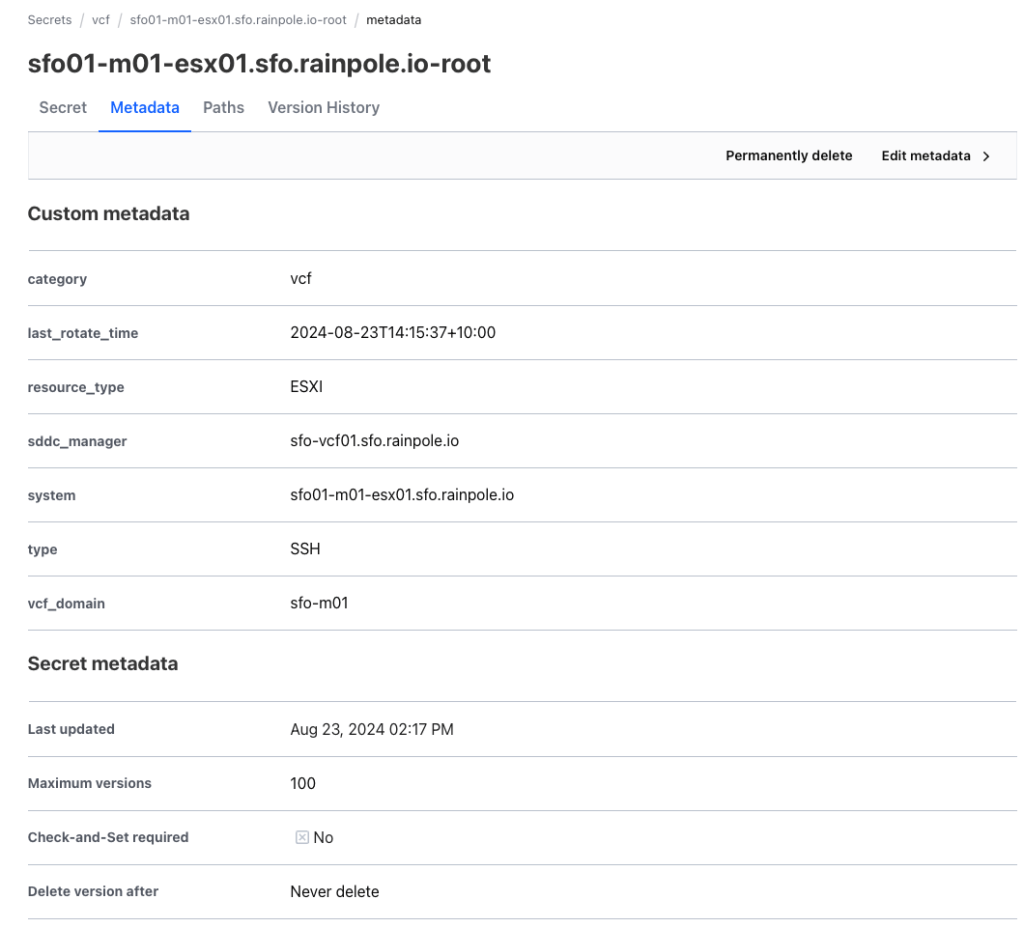
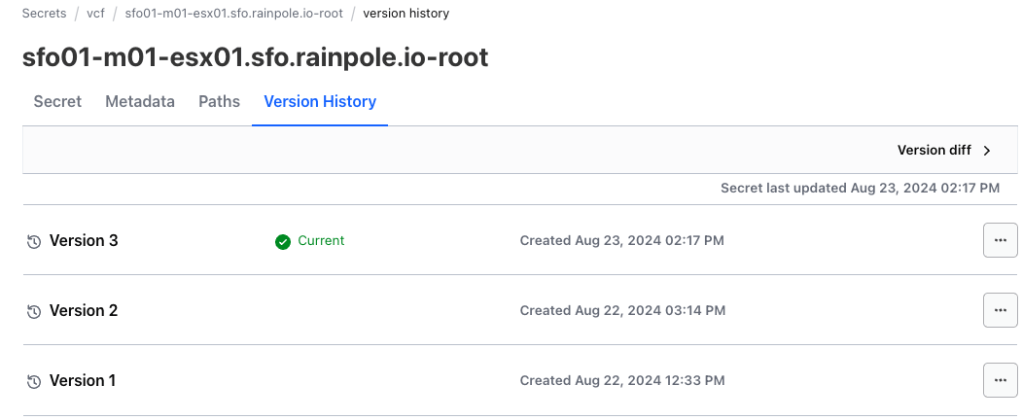
In case you have not tried the VCF Terraform Provider, I have shared the link here for your convenience.
In addition, if you would like to contribute to the development of the VCF Terraform Provider, any assistance is more than welcome!
Thank you for your reading!
 davidwzhang.com