
Since I have been working on the Terraform VCF Provider, I use it as an example.
Build
On my Mac, I built the Terraform provider for Windows.
GOOS=windows GOARCH=amd64 go build -o terraform-provider-vcf.exeInstall Terraform
Step 1: From the download, extract the executable to a directory, for example
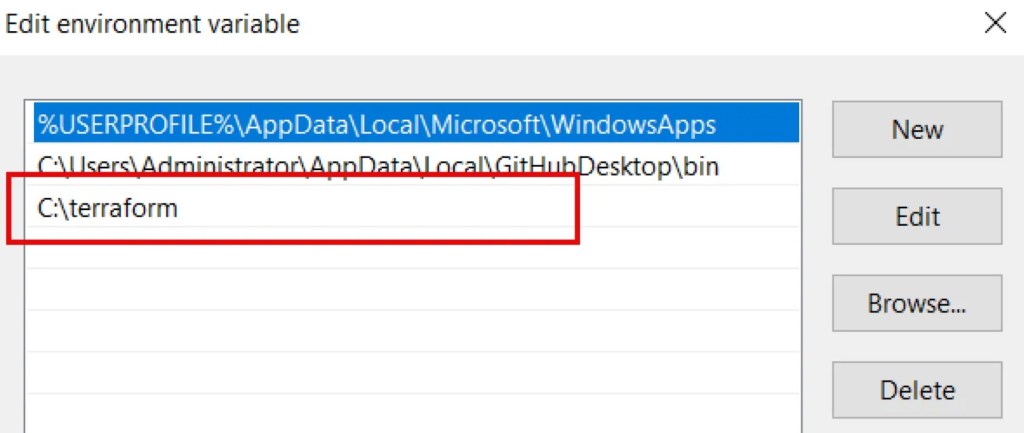
c:\terraformStep 2: Add the folder to the environment path.
Type system in search and select Edit the system environment variables

In the System Properties window, select Environment Variables

Edit Path

Add terraform.exe path.
Configure to use the local build/custom provider
Below is a suggested approach:
Create a file terraform.rc and add the newly created file to %APPDATA%\terraform.d\
The content of terraform.rc file
provider_installation {
  dev_overrides {
    "vmware/vcf" = "F:\terraform\providers\vcf"
  }
  direct {}
}
Note: terraform-provider-vcf.exe is in F:\terraform\providers\vcf
However, it appears that Terraform doesn’t endorse the above configuration. I have to use the following workaround.
$env:TF_CLI_CONFIG_FILE="$env:APPDATA\terraform.d\terraform.rc"You may want to enable the debug mode.
$env:TF_LOG="DEBUG” davidwzhang.com