
- Preface
- Step 1: Add an L2 VPN Server service
- Step 2: Create L2VPN Local Endpoint
- Step 3: Create L2VPN Session
- Step 4: Enable Connectivity
- Step 5. On-Prem NSX Autonomous Edge
Preface
I wrote a blog in 2020 about setting up an L2VPN from on-premise to the VMC NSX T0 router. Since SDDC 1.18, VMware Cloud on AWS introduced the support for custom T1. The blog will show you how to set up an L2VPN between your on-premise NSX autonomous edge and a custom Routed T1.
Step 1: Add an L2 VPN Server service
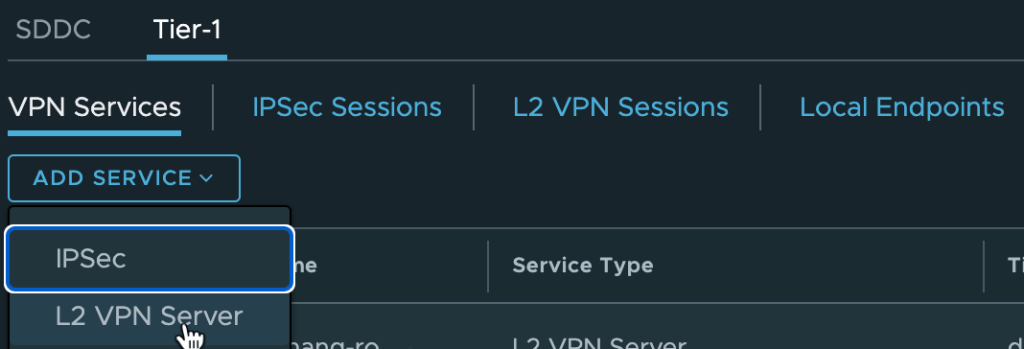
Select the routed T1 as the Tier-1 Gateway for the L2VPN Server service. My L2VPN Server service is named dzhang-routed01-l2vpnsrv

Step 2: Create L2VPN Local Endpoint
You can’t create an L2VPN local endpoint using the L2 VPN Service you created in Step 1. Therefore, I utilized an IPSec VPN service named dzhang-routed01-vpnsrv. Also, I assigned a local endpoint with the IP address 192.168.34.10. The only requirement for this endpoint IP is that it cannot overlap with the SDDC management CIDR and must not be a used IP within the SDDC.
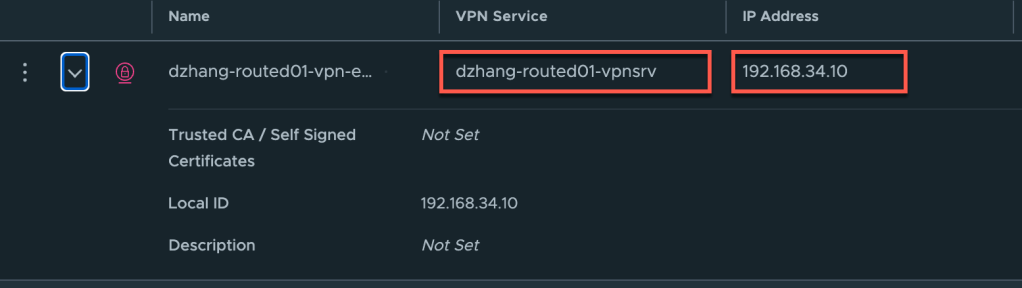
Step 3: Create L2VPN Session
In this step, we need to use the new L2VPN Server service: dzhang-routed01-l2vpnsrv, that we created in step 1.
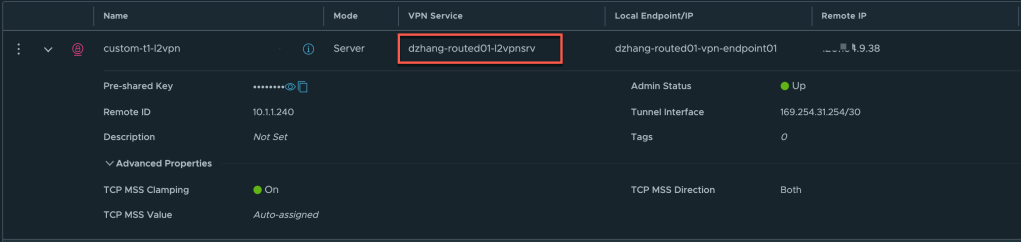
Two important points to note when creating the L2VPN session:.
- You need to allocate a subnet for the Tunnel interface, I used
169.254.31.254/30here. - The required
Remote IPis the public IP of your on-prem L2VPN client (NSX autonomous edge), andremote IDis the uplink IP of the on-prem NSX autonomous edge.
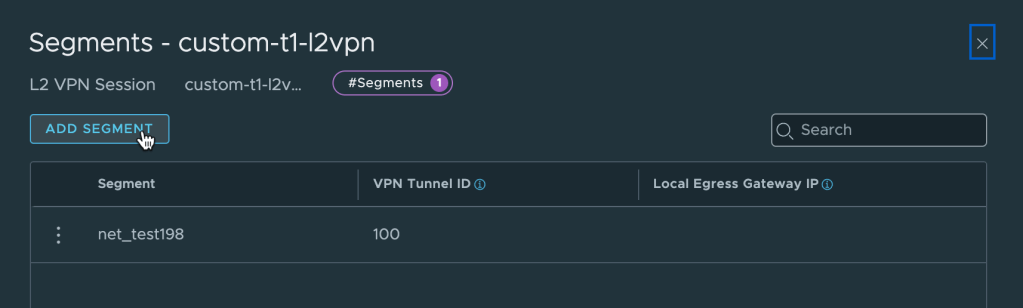
Feel free to add the required network segments to the created L2VPN. Here I added a network net_test198 and assigned 100 as its VPN Tunnel ID.
Step 4: Enable Connectivity
This step involves two parts:
- Compute Gateway NAT
Go to request a public IP in the VMware Cloud on SDDC, then add a static NAT rule to map the new public IP to the VPN Endpoint.

2. Allow inbound network connectivity from on-prem NSX autonomous edge to the VPN local endpoint.
Step 5. On-Prem NSX Autonomous Edge
There is no difference in configuring the NSX Autonomous Edge when using custom T1 as an L2VPN server. You can follow my blog to complete the configuration. https://davidwzhang.com/2020/02/24/setting-up-l2vpn-in-vmc-on-aws/
Thank you for your reading!
 davidwzhang.com