
Just got time this weekend to test the newly released dev version of Ansible F5 HTTPs health monitor. The result of testing looks good: most of common use cases have been covered properly.
Below is my first playbook for my testing:
# This version is to create a new https health monitor

---

- name: f5 config

  hosts:  lb.davidwzhang.com

  connection: local

  vars:

    ports:

      - 443

  tasks:

    - name: creat http healthmonitor

      bigip_monitor_https:

        state:  "present"

        #state: "absent"

        name: "ansible-httpshealthmonitor"

        password: "password"

        server: "10.1.1.122"

        user: "admin"

        validate_certs: "no"

        send: "Get /cgi-bin/env.sh HTTP/1.1\r\nHost:192.168.72.28\r\nConnection: Close\r\n"

        receive: "web"

        interval: "3"

        timeout: "10"

      delegate_to:  localhost
After run the playbook, I log in my F5 BIGIP VE and see the https health monitor has been created successfully.

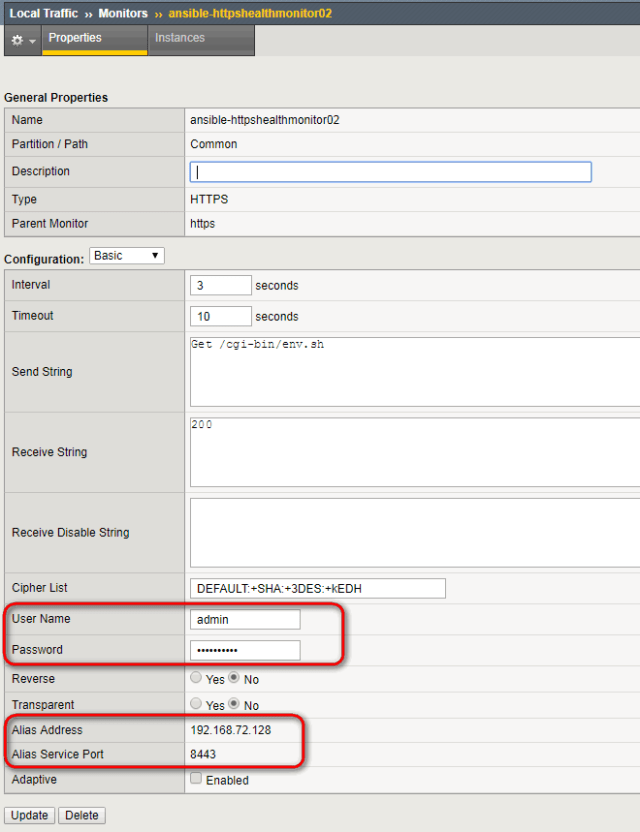
I tried to create another HTTPs health monitor, which includes basic authentication(admin/password) and customized alias address and alias service port(8443).
Playbook:
# This version is to create a new HTTP health monitor

---

- name: f5 config

  hosts:  lb.davidwzhang.com

  connection: local

  vars:

    ports:

      - 443

  tasks:

    - name: creat http healthmonitor

      bigip_monitor_https:

        state:  "present"

        #state: "absent"

        name: "ansible-httpshealthmonitor02"

        password: "password"

        server: "10.1.1.122"

        user: "admin"

        validate_certs: "no"

        ip: "192.168.72.128"

        port: "8443"

        send: "Get /cgi-bin/env.sh\r\n"

        receive: "200"

        interval: "3"

        timeout: "10"

        target_username: "admin"

        target_password: "password"

      delegate_to:  localhost
In F5, you can see the below:
In addition, you possibly noticed that I comment a line in the above 2 playbooks:
#state: "absent"
You can use it to remove the health monitor.
 davidwzhang.com
Excellent.. Thanks David
LikeLike