
📚 VCF 9.1 Fleet Management Series
This post is part of our ongoing series on infrastructure automation and certificate lifecycle management in VMware Cloud Foundation (VCF):
- Part 1: VCF 9.1 Fleet Management API (1): Certificate Management with Custom CA
- Part 2: VCF 9.1 Fleet Management API (2): Certificate Lifecycle with Integrated MSFT CA
- Part 3: VCF 9.1 Fleet Management API (3): Automated Password Management
- Part 4: VCF 9 Certificate Management for Split-Server MSFT CA Deployments (You are here)
In previous posts, we explored how VCF Operations integrates natively with Microsoft Active Directory Certificate Services (AD CS) to automate certificate generation, signing, and replacement across your environment with a single API call or UI action.
However, enterprise IT environments previously ran into a notable architectural constraint:
“When connecting to Microsoft Active Directory Certificate Services, ensure that the Web Enrollment role is installed on the same machine where the Certification Authority role is installed.”
For many security-conscious enterprise organizations, hosting the IIS-based AD CS Web Enrollment role (certsrv) on the exact same server as the core Certification Authority (CA) was a non-starter due to attack surface reduction policies.
Now the limit has been removed for VCF 9 and above release. VCF 9 natively supports split-server MSFT CA deployments, where the Web Enrollment server and the Certification Authority are hosted on separate machines.
The Architectural Shift and The Double-Hop Challenge
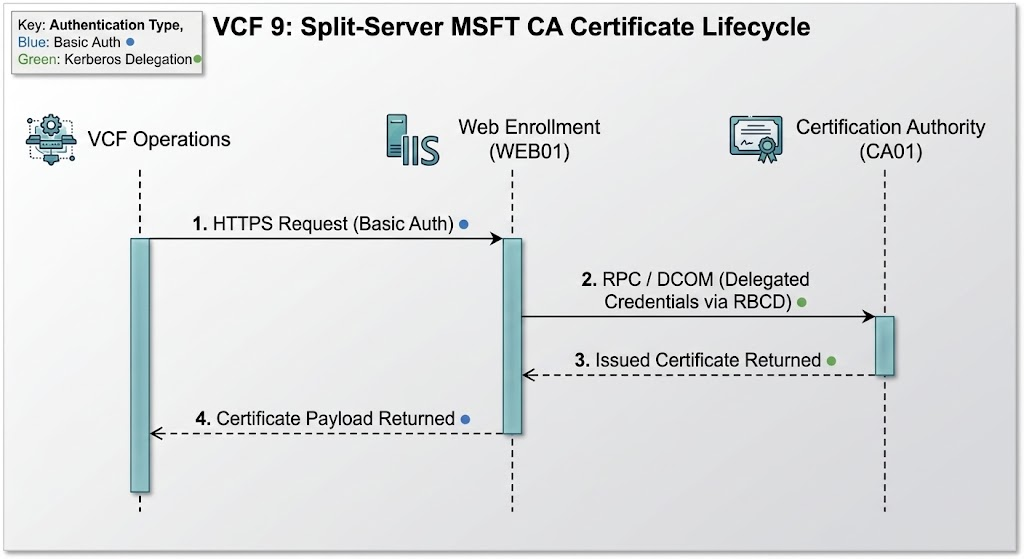
In a co-located setup, VCF communicates over HTTPS to the IIS Web Enrollment interface, which invokes the local DCOM/RPC interface directly on the CA.
In a split-server architecture:
- VCF Operations sends an HTTP/HTTPS request with Basic Authentication to the Web Enrollment Server.
- Web Enrollment processes the request and must call out remotely over RPC/DCOM to the Certification Authority to request, sign, or fetch certificates on behalf of the user.
This multi-server traversal introduces a classic Active Directory challenge: the Kerberos Double-Hop. When IIS receives Basic Auth credentials, standard network logon tokens cannot automatically hop to a third machine unless Kerberos Constrained Delegation and protocol transition are properly configured.
Security Guidelines: Mitigating Delegation and Auth Risks
Enabling Kerberos Protocol Transition and Basic Authentication opens up credential delegation paths. To maintain a robust security posture, consider these hardening guidelines:
- Enforce HTTPS / TLS 1.2+ Strictly on IIS:
- Basic Authentication transmits passwords in base64. Ensure the Web Enrollment IIS site (
Default Web Site/CertSrv) enforces HTTPS with TLS 1.2 or higher using a valid, trusted certificate.
- Basic Authentication transmits passwords in base64. Ensure the Web Enrollment IIS site (
- Restrict Delegation Scope via RBCD:
- Use Resource-Based Constrained Delegation (
PrincipalsAllowedToDelegateToAccount) targeted strictly toCA01. Never enable Unconstrained Delegation or broad user-based delegation on the Web Enrollment computer account.
- Use Resource-Based Constrained Delegation (
- Principle of Least Privilege for Service Accounts:
- Do not grant
svc-mscalocal administrative rights onWEB01orCA01. - Restrict template permissions exclusively to
ReadandEnroll(do not checkFull ControlorAutoenroll).
- Do not grant
- Isolate the Web Enrollment Server:
- Treat
WEB01as a hardened reverse-proxy/bridge server. - Restrict outbound firewall traffic from
WEB01so it can only communicate withCA01over RPC/DCOM and Domain Controllers over standard AD ports.
- Treat
- Auditing & Event Monitoring:
- Enable security event logging for Logon events (Event ID 4624) and AD CS certificate requests (Event ID 4886/4887) to monitor delegation and certificate issuance activity.
Integrate MSFT CA with VCF Operations
Once the AD CS infrastructure is configured, you are ready to add the integration in VCF Operations.
In the VCF Operations user interface:
- Navigate to Fleet Management -> Certificates.
- Click Configure CA For Fleet and select Microsoft CA (MSCA).
- Supply the integration details:
- CA Server URL:
https://vcfops-m01-iis.certs.vcfops.com/certsrv(Points directly to the remote Web Enrollment server) - User Name:
svc-msca@certs.vcfops.com( Use UPN format username or Down-Level Logon Name username)) - Password:
•••••••••••• - Certificate Template:
vcf
- CA Server URL:
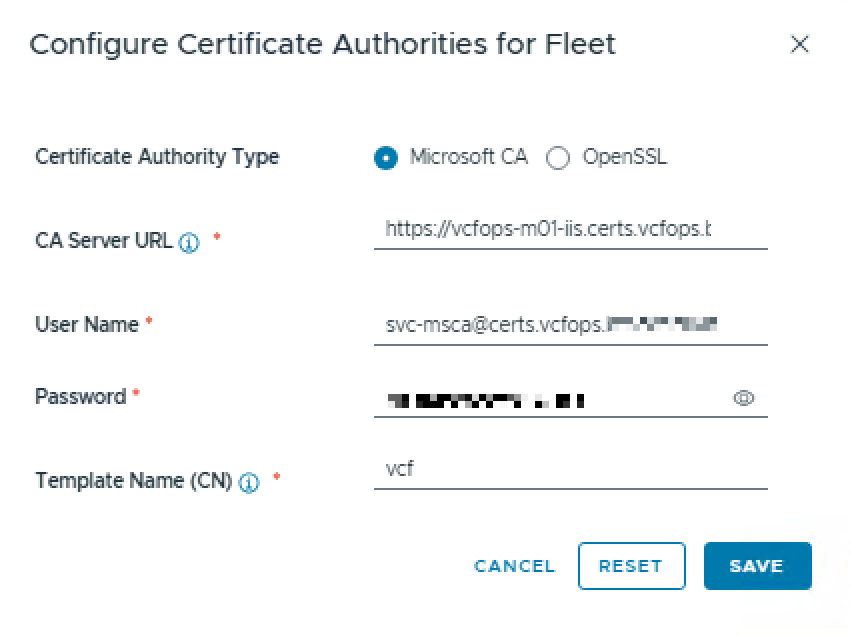
Once the integration is completed, you can leverage the native integration for end to end lifecycle including certificate auto-renew and replacement.
Conclusion
By supporting split-server Microsoft CA topologies in VCF 9, Broadcom enables enterprise customers to adhere to strict PKI segregation policies without sacrificing automated certificate lifecycle management. With proper Resource-Based Constrained Delegation (RBCD) and TLS enforcement in place, organizations get both enterprise-grade security hardening and true “single-click” certificate automation across their fleet.
Looking Ahead
To further simplify integration and eliminate reliance on IIS Web Enrollment, Broadcom plans to introduce support for Microsoft Active Directory Certificate Services integration via Certificate Enrollment Web Service (CES) and Certificate Enrollment Policy Web Service (CEP) in upcoming releases. This will offer modern, REST/SOAP-based certificate enrollment paths for even stricter PKI policies. Please stay tuned.


Pingback: VCF 9.1 Fleet Management API (1): Certificate Management with Custom CA – davidwzhang.com
Pingback: VCF 9.1 Fleet Management API (2): Certificate Lifecycle with Integrated MSFT CA – davidwzhang.com
Pingback: VCF 9.1 Fleet Management API (3): Automated Password Management – davidwzhang.com