
Introduction and Problem Statement
With the introduction of VCF Single Sign-On (SSO)—powered by the VCF Identity Broker—organizations gain a unified authentication architecture across VMware Cloud Foundation components, with vCenter Server at the center of ecosystem management.
From an API and authentication security perspective, modern VCF SSO encourages OAuth 2.0 flows relying on API Clients and API Tokens. However, IT administrators face an immediate operational reality: many third-party tools, backup products, monitoring solutions, and custom automation scripts interact with vCenter exclusively via API-based integrations using traditional Active Directory service accounts.
These API-driven tools—whether using the vSphere Web Services (SOAP) API, vSphere Automation APIs, or PowerShell/PowerCLI scripts—typically authenticate by passing standard username and password credentials to vCenter.
The big question: If we enable VCF Single Sign-On on vCenter Server, will our existing API-based third-party tools and scripts break, or can they continue using service account credentials?
The short answer: Yes, your API-based integrations can continue using service accounts with traditional username/password authentication. How this functions under the hood depends on your Identity Provider (IdP) architecture.
How API AD Service Account Authentication Works Post-VCF SSO Enablement
When VCF SSO is enabled, vCenter delegates credential validation to the underlying VCF Identity Broker while keeping the API endpoints accessible to upstream clients.
Use Case 1: Identity Provider is Active Directory
If your enterprise uses Active Directory directly as the Identity Source for VCF SSO:
- The API Integration Flow: Third-party applications, SDKs, and scripts call the vCenter API (e.g., SessionManager via SOAP API, vSphere Automation API, or PowerCLI) and submit the AD service account username and password as they always have.
- Under the Hood: The VCF Identity Broker validates the credentials against Active Directory via LDAPs on behalf of vCenter Server and issues the session context seamlessly.
- Customer Impact: Zero operational change. API integrations work identically to pre-VCF SSO configurations without requiring API client registration, secret generation, or code modifications.
Validated API Execution Example (Active Directory / PowerCLI)
Below is a validated PowerShell session demonstrating that PowerCLI scripts connecting via the vCenter API (Connect-VIServer) with an AD service account (dzhang@rainpole.local) continue to authenticate and query vCenter objects successfully post-VCF SSO:
PS C:\Users\Administrator> # --- 1. CONFIGURATION VARIABLES ---PS C:\Users\Administrator> $VCenterServer = "sfo-m01-vc01.sfo.rainpole.io"PS C:\Users\Administrator> $DatacenterName = "sfo-m01-dc01"PS C:\Users\Administrator> $ClusterName = "sfo-m01-cl01"PS C:\Users\Administrator> $vcUsername = "dzhang@rainpole.local"PS C:\Users\Administrator> $vcPassword = 'VMware123!VMware123!'PS C:\Users\Administrator>PS C:\Users\Administrator> # --- 2. CONNECT & INITIALIZE API SESSION ---PS C:\Users\Administrator> Connect-VIServer -Server $VCenterServer -Username $vcUsername -Password $vcPasswordName Port User---- ---- ----sfo-m01-vc01.sfo.rainpole.io 443 RAINPOLE.LOCAL\dzhangPS C:\Users\Administrator> # --- 3. VERIFY VCENTER API OBJECT QUERY ---PS C:\Users\Administrator> Get-Datacenter $DatacenterNameName----sfo-m01-dc01PS C:\Users\Administrator> Get-Cluster -Name $ClusterNameName HAEnabled HAFailover DrsEnabled DrsAutomationLevel Level---- --------- ---------- ---------- ------------------sfo-m01-cl01 True 1 True FullyAutomatedPS C:\Users\Administrator>
Use Case 2: Identity Provider is a Modern IdP
Many enterprises are transitioning authentication to modern cloud IdPs like Okta, Microsoft Entra ID or PingFederate.
When modern IdPs are integrated with VCF SSO via OpenID Connect (OIDC), third-party API clients that do not natively support OAuth 2.0 token acquisition can still submit username/password credentials by leveraging the OAuth 2.0 Resource Owner Password Credentials (ROPC) / Password Grant.
- The API Integration Flow: The third-party tool or script submits the enterprise service account credentials via the standard vCenter login API call.
- Under the Hood: The VCF Identity Broker uses the OIDC Password Grant (grant_type=password) flow behind the scenes to authenticate against Okta (or your modern IdP) and exchange the credentials for a valid vCenter token session.
- Customer Impact: Seamless continuity for legacy API callers. Third-party applications continue using standard username/password logins, while your organization centralizes authentication governance and policy enforcement at the enterprise IdP layer.
Configuration Requirement: Ensure your modern IdP (e.g., Okta or Entra ID) has the Password Grant / ROPC flow enabled for the application integration associated with vCenter service accounts. Below shows that the Password Grant has been enabled for an native application in Okta.
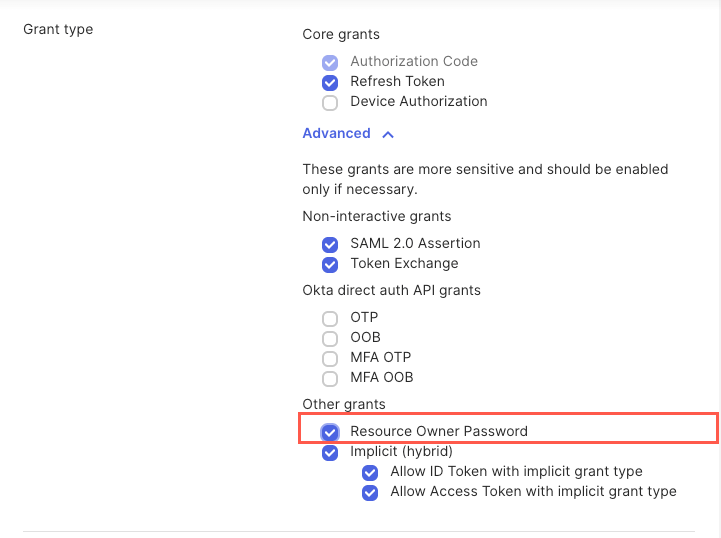
Validated API Execution Example (Okta with Password Grant Enabled)
Below is a validated PowerShell session demonstrating that once Okta’s Password Grant is enabled, an Okta-backed service account (okta1000@davidwzhang.org) authenticates seamlessly over PowerCLI without changing any API code:
PS C:\Users\Administrator> # --- 1. CONFIGURATION VARIABLES ---PS C:\Users\Administrator> $VCenterServer = "sfo-m01-vc01.sfo.rainpole.io"PS C:\Users\Administrator> $DatacenterName = "sfo-m01-dc01"PS C:\Users\Administrator> $ClusterName = "sfo-m01-cl01"PS C:\Users\Administrator> $vcUsername = "okta1000@davidwzhang.org"PS C:\Users\Administrator> $vcPassword = 'VMware123!VMware123!'PS C:\Users\Administrator>PS C:\Users\Administrator> # --- 2. CONNECT & INITIALIZE ---PS C:\Users\Administrator> Connect-VIServer -Server $VCenterServer -Username $vcUsername -Password $vcPasswordName Port User---- ---- ----sfo-m01-vc01.sfo.rainpole.io 443 DAVIDWZHANG.ORG\okta1000PS C:\Users\Administrator> # --- 3. VERIFY VCENTER API OBJECT QUERY ---PS C:\Users\Administrator> Get-Datacenter $DatacenterNameName----sfo-m01-dc01PS C:\Users\Administrator>
Summary and Recommendation
Enabling VCF Single Sign-On on vCenter Server does not force an immediate overhaul of your API-based ecosystem:
| Identity Provider | Credential Type | vCenter API Auth Mechanism | Third-Party API Impact |
| Active Directory | Username & Password | Direct AD LDAPs via Identity Broker | No Change: PowerCLI, REST, and SOAP APIs function as today. |
| Modern IdP (Okta, MSFT Entra ID, etc.) | Username & Password | OIDC Password Grant (grant_type=password) | No Change: Preserves username/password API login workflows. |
While adopting OAuth 2.0 based API Clients and Tokens remains the long-term target architecture for securing programmatic access, VCF SSO maintains full backward compatibility for service accounts—ensuring your existing scripts, backup software, and management utilities continue operating without downtime.

